Before you sign up
- You need to be an adult under your country's laws.
- US residents can't open an account, and some other countries are restricted. Check the client agreement first.
- Have an ID document and a proof of address ready, since verification comes before real money moves.
- Decide whether you want the bonus. If you do, plan the first deposit for the first 24 hours.
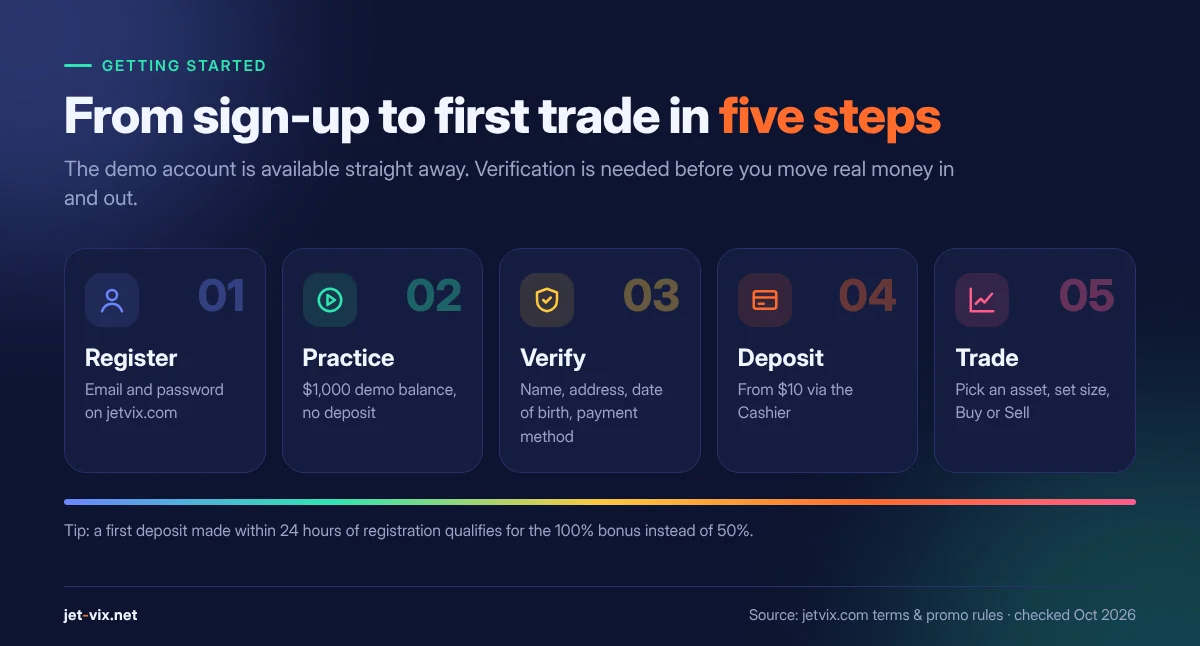
Step 1: Register
Go to jetvix.com and hit Start free or Trade. Enter an email and a password and confirm. That's it. You're in the terminal with a demo account already loaded.
Step 2: Get to know the demo
The demo has $1,000 of virtual money and real prices. Use it to do three things before you deposit: open a trade and read the margin figure in the order window, set a Stop Loss and watch it trigger, and hold a position overnight to see the rollover fee. Half an hour of this saves a lot of real money.
Step 3: Verify your identity
Verification is required for every account holder. It's standard know-your-customer checking under Jetvix's AML and KYC policy, and it covers:
- full name and date of birth
- residential address
- phone number
- the payment method you'll use
Get this done before your first deposit. It's much less stressful than doing it while a withdrawal waits.
Step 4: Make a deposit
- Click Deposit in the terminal to open the Cashier.
- Choose a payment method. The list depends on your country. Jetvix has connected local methods across most of Latin America, alongside cards and bank transfers.
- Fill in the amount and details.
- Press Top up.
Step 5: Place your first trade
- Open Trade and pick an instrument.
- Click Buy or Sell. A window shows the current rate, trade size, position value and required margin.
- Set the size. Start with 0.01 lot.
- Add a Stop Loss and, if you like, a Take Profit. Both are free.
- Confirm. The position appears in the Positions tab, where you can close it fully or partly.
Withdrawing money
Open the Cashier, click Withdraw, pick the method, fill in the fields and confirm. A few rules affect what you can take out:
- While a bonus is active, you can only withdraw your own money, and the bonus shrinks proportionally.
- Withdrawing after Respawn without trading costs 10%.
- Loyalty statuses come with daily and monthly fee-free limits. Above them, a 10% fee applies.
A sensible habit with any offshore broker: once you're verified, make a small test withdrawal early. It tells you how the process works before larger sums are involved.
Account settings and passwords
To change your password, use the arrow in the top-right corner, open Settings and select Change password. Forgot it? Click Forgot Password on the login page and follow the link Jetvix emails you.
Quick facts
- Jetvix registration requires
- email and password
- Jetvix verification checks
- name, date of birth, address, phone, payment method
- Jetvix deposit is made via
- Cashier → Deposit → Top up
- Jetvix withdrawal is made via
- Cashier → Withdraw
- First deposit within 24h earns
- 100% bonus
- Jetvix minimum client age
- adult under local law
Getting-started FAQ
Do I need to verify my Jetvix account?
How do I deposit on Jetvix?
How do I withdraw from Jetvix?
I forgot my Jetvix password. What now?
See it for yourself on the demo
$1,000 in practice funds, the same terminal as the live account, no deposit. If it clicks, switch to live from the top-right corner.
Affiliate link. CFDs are high-risk; you can lose all the money you deposit.